

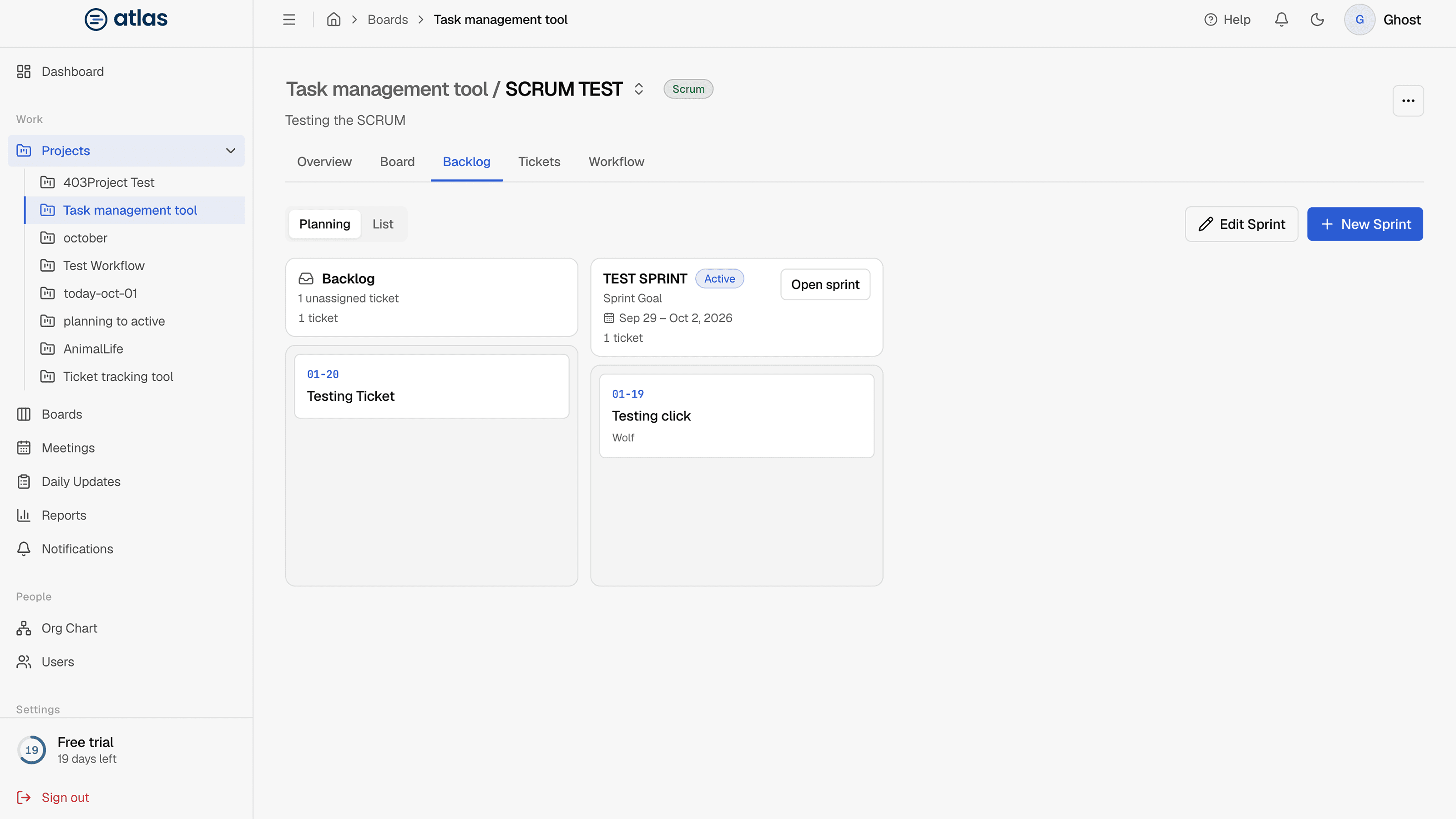
The Backlog tab has two views. Use Planning to drag tickets into sprints, and List to edit many tickets quickly.
Planning view
"Drag tickets between the backlog and sprints to plan upcoming work." Columns show the Backlog, the active sprint and each planned sprint. Drag a ticket from one column to another to move it, or within a column to change its order.
List view
A table grouped by sprint: Backlog first, then the active sprint, then planned sprints.
Edit inline
Select a cell to change a ticket's title, sprint, status, priority, story points or assignee. Press Enter to save or Esc to cancel. Tick a row's checkbox to complete or reopen a ticket.
Bulk edit
Select several rows to open the bulk bar, then Move to sprint, set the Assignee, or set the Priority for all of them at once.
Sort and filter
Each column header has sort and filter options:
| Column | Filter options |
|---|---|
| Type | Epic, Story, Task, Bug, Subtask |
| Epic | A specific epic |
| Sprint | A specific sprint, or Backlog |
| Status | A specific stage, or Open only |
| Priority | A specific priority, or High+ |
| Points | Has points, or None |
| Assignee | Me, Unassigned, or a person |